Right now, someone downstream is doing your monitoring for you.
They just don't know it.
Monitoring for cron jobs, scheduled tasks, and pipelines. We page you when one stops running — with an AI diagnosis of what broke.
Free. One curl line. Sixty seconds.
When your nightly job stops running tonight, the person who finds out first probably won't be you. It'll be the analyst staring at a blank report Monday morning, or the customer support rep on the receiving end of a confused ticket. They notice. You don't. Your system was silent when it failed.
Your choices.
Keep doing this.
The ticket gets filed. The job goes again tonight. Most nights it works. The night it doesn't is the one you and everyone else remembers but would rather forget.
Fix just this one.
Pick the one job that's been bugging you. Just that one. Then add a curl line and we tell you before anyone else does.
What you actually see.
Your dashboard, your alert, the AI diagnosis. All in one place.
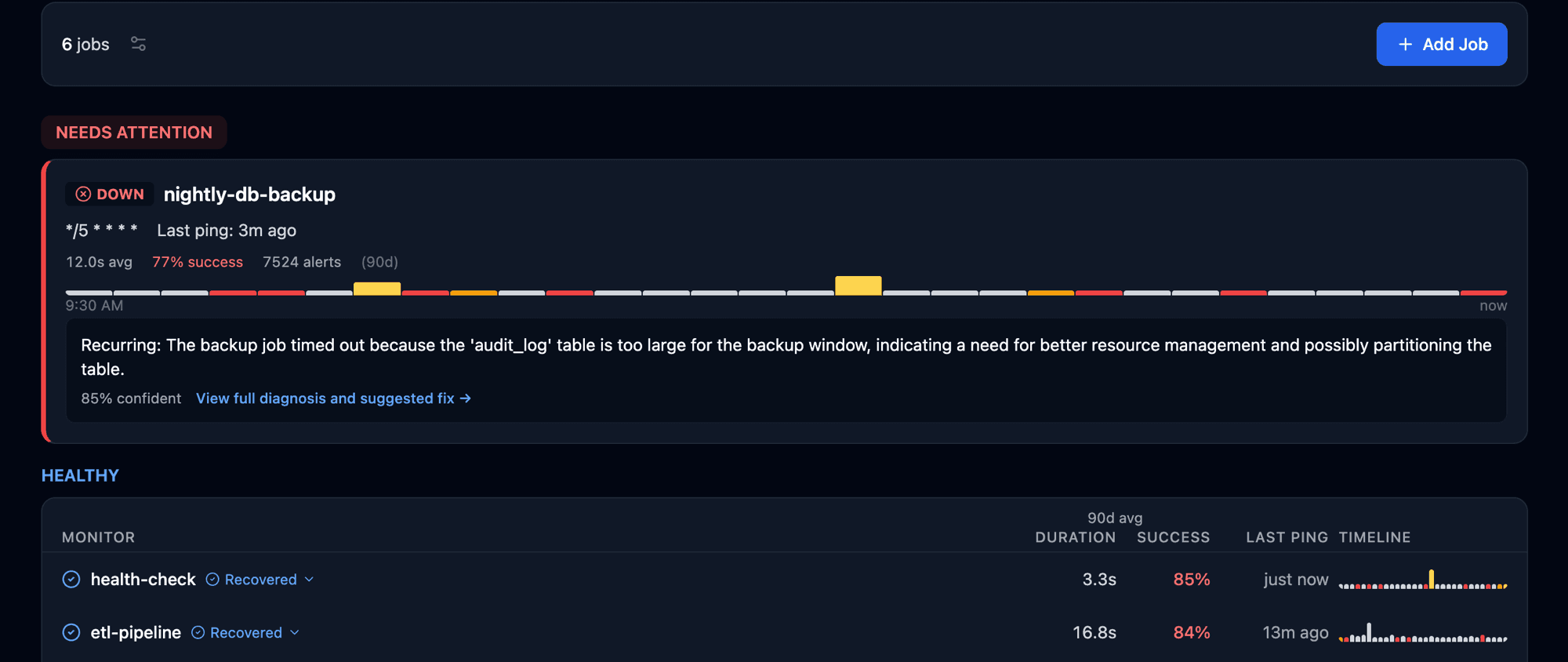
Wouldn't you rather know about the failure this way than with an angry email or another support ticket in the queue?
Built for the messy reality of scheduled jobs.
Not a checkbox monitor. The features that actually matter when something breaks at 3 AM.
AI root-cause diagnosis
GPT-4o-mini reads your stderr and tells you what broke. Not just an alert — an answer.
Adaptive thresholds
Each job’s normal duration is learned, not configured. Slow runs alert before they become outages.
Every channel, every plan
Email, Slack, Discord, Teams, PagerDuty — included on every plan, even Free.
Cron format you can paste
@daily, Quartz 6-field, AWS cron(), Jenkins H, ?. Paste anything; we translate.
First job free.
$2/month for each additional job.
You don't pick a tier. You pick which jobs are worth protecting.
Free. One curl line. Sixty seconds.